AI Receipt Scanner
Scan a week of receipts in a minute
Point your camera. AI extracts every line item, total, tax, and store. No retyping — 95% of receipts need no corrections.
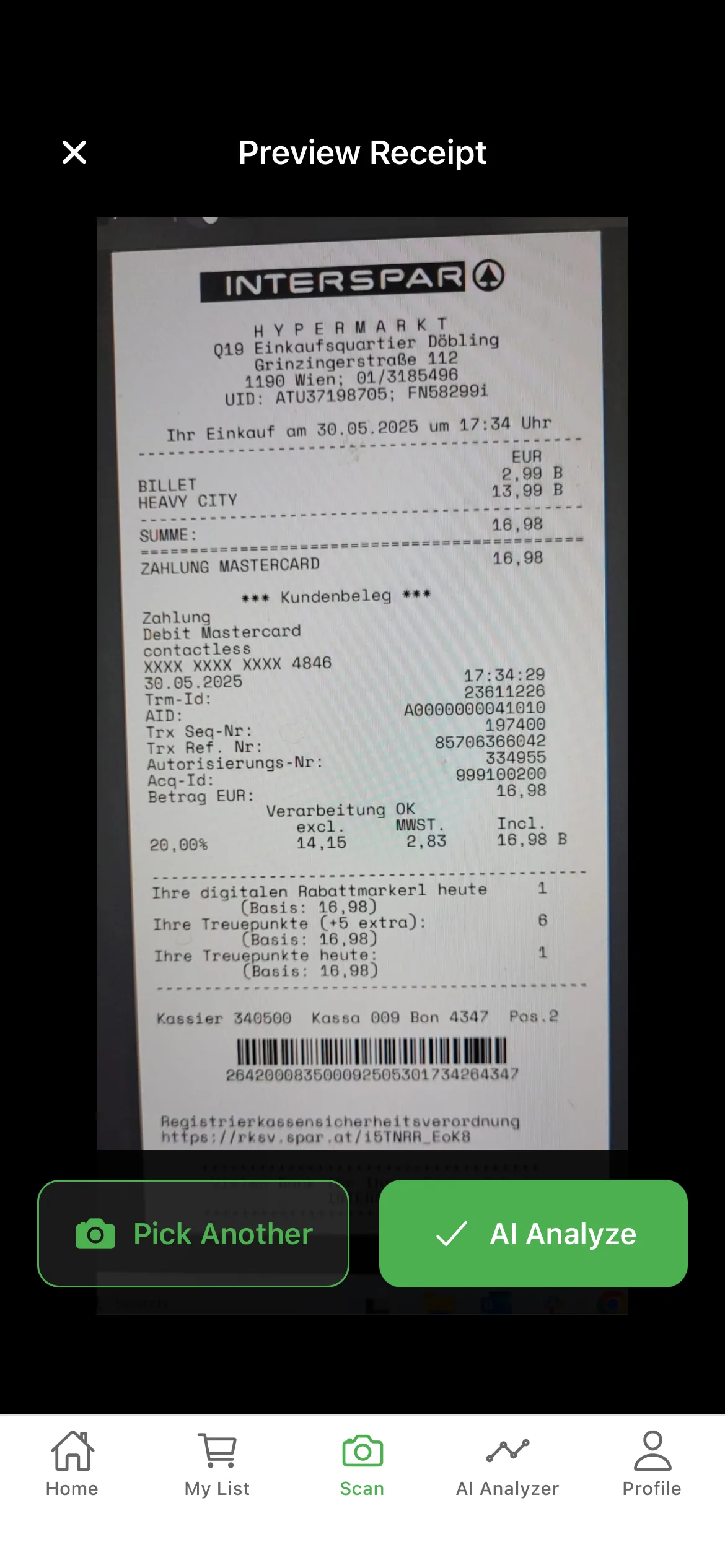
Snap a receipt and AI sorts every item, store, and category in seconds — then tracks each product’s price over time, so you catch shrinkflation and fake “deals” instantly.

Free to downloadNo credit cardWorks in guest mode
Works with receipts from
GroceryTracker Pro is a free iOS and Android app that turns paper grocery receipts into an automatic household budget. The app uses AI to extract every line item, total, tax, and store name from a photo or PDF in roughly ten seconds, with around 95% accuracy on standard supermarket receipts — including faded and crumpled ones. Receipts are sorted by store, category, and month, and a per-item price history surfaces shrinkflation and fake “deals”: a €19.95 olive oil can be checked against its 12-month low at the same store with one tap. Households can share one budget in real time across multiple members, and AI insights answer specific questions like “Why was last month higher?” using your own receipt history. The app supports English, German, Spanish, and French, and currencies including USD, EUR, and GBP. Premium unlocks unlimited scans; the free tier requires no signup.
Most people feel the squeeze but can’t answer one simple question: Where did this month’s grocery money actually go?
Banking apps lump groceries with everything. You know it’s expensive, but not why.
Manual entry is great… for the first three receipts. Then the file sits unopened.
You don’t need a net-worth dashboard. You need to know if Aldi or Costco is cheaper this month.
No typing, no categorizing, no spreadsheet.
Take a photo or import a PDF. Our AI reads items, prices, totals, and store name automatically.
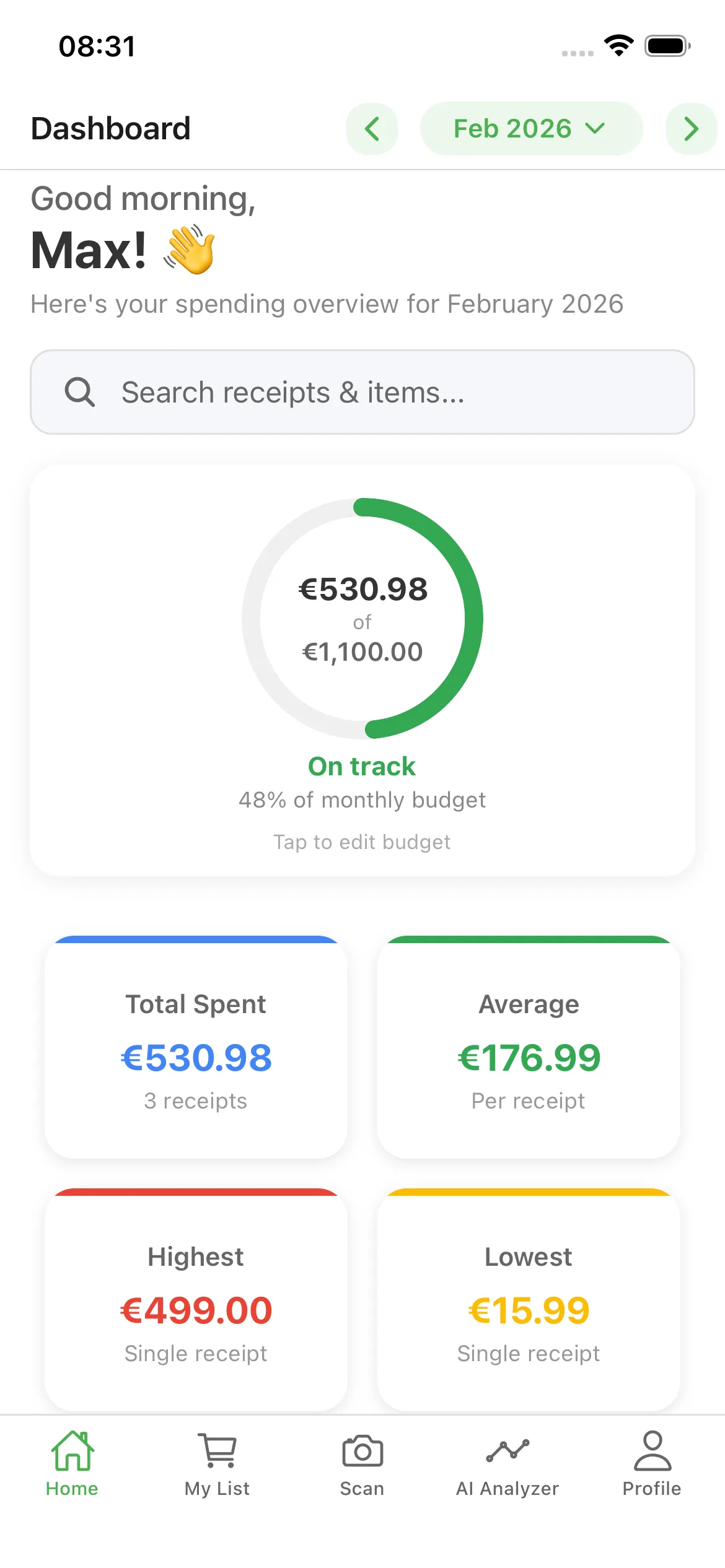
Everything sorted by store, category, and month. Your budget bar updates instantly.
AI insights tell you where to cut, which store to choose, and how to stay under budget next month.
Six tools that turn a pile of receipts into real grocery savings.
Point your camera. AI extracts every line item, total, tax, and store. No retyping — 95% of receipts need no corrections.
Ask “Why was last month higher?” and get specific answers from your receipts — not generic advice.
Tap any item for its full price history at that store. Know if today’s €19.95 olive oil is really a deal.
Invite your partner or family. Everyone scans, everyone sees the same dashboard in real time.
Weekly and monthly charts show exactly when and where spending creeps up — before it’s a problem.
Weekly flyer deals from Walmart, Kroger, Metro, Sobeys and more, matched to what you buy. Needs your postal code. Available in the US, Canada and Germany.
Updated April 2026.
| Spreadsheet | Generic app | GroceryTracker Pro | |
|---|---|---|---|
| Scan grocery receipts | Manual entry | Rarely | AI-powered |
| Track spending by store | Manual formulas | Limited | Built in |
| Household sharing | Messy | Often paid add-on | Real-time sync |
| Grocery-specific insights | No | Generic only | AI tailored |
| Per-item price history | No | No | Per store, over time |
| You’ll actually keep using it | Until week 2 | Sometimes | Designed for it |
“I have been using this app for a couple of months now and find it incredibly helpful. Being able to reverse engineer from my grocery receipts to see where my most spending is occurring has been fantastic. Having the different categories grouped by food group is also really helpful and intuitive. The AI feature is a nice addition. Recently I needed customer service support, which was both really quick and efficient in resolving my issue and went the extra mile for me. Shout out to Nemo!”
“The app is very easy to use and very convenient if you want to track your spending and such. Thank you for this free app.”
“Great app, simple, smart, and effective. Makes managing shopping receipts much easier.”
No store wins every aisle. We compare a representative basket across the big chains — and show how to find your own cheapest store.
Read more →The layout, pricing, and even the smells are engineered to grow your basket. Here are 10 tricks — and the simple defense for each.
Read more →Real numbers by household size, the 5-category method, and the weekly check-in that prevents end-of-month surprises.
Read more →Forever. No card required.
or $29.99/year — save ~50%
GroceryTracker Pro is a grocery receipt scanner and budget tracker for iOS and Android. You take a photo of a paper receipt or import a PDF, and the app’s AI extracts every line item, total, tax, and store name in roughly ten seconds. Each receipt is automatically sorted by store, category, and month, and your monthly grocery budget bar updates immediately. Per-item price history is saved per store so you can spot price hikes and shrinkflation. Households can share a single budget in real time, and AI insights answer questions like “Why was last month higher?” using your own receipt data.
Both. GroceryTracker Pro starts as an AI grocery receipt scanner so you don’t have to type anything in, and then turns those receipts into a full grocery budget tracker with monthly limits, store comparisons, category breakdowns, and per-item price history. Unlike generic budget apps that lump groceries with other spending, GroceryTracker Pro is built specifically for food and household shopping.
Yes. Receipts and spending data are stored on secure cloud infrastructure with account-based access controls, and only members of your household can see your shared budget. You can also use guest mode entirely on-device without creating an account. You own your data, and you can export it or permanently delete your account at any time. The app does not sell personal data to third parties.
Yes. Household sharing lets multiple members — partners, roommates, or family — add receipts to the same shared budget and see updates in real time. Everyone scans on their own phone, and the dashboard shows who scanned what. There is one shared monthly grocery budget per household, with per-store and per-category breakdowns visible to every member.
Yes — GroceryTracker Pro is free to download on iOS and Android, with no credit card or signup required to start scanning. The free tier includes core grocery receipt scanning, monthly budget tracking, store and category breakdowns, and basic AI insights. Premium is an optional subscription that unlocks unlimited scans, deeper AI analysis, and enhanced PDF exports. Premium can be canceled at any time.
GroceryTracker Pro works with receipts from most major supermarkets and local grocery stores worldwide — including Walmart, Costco, Aldi, Lidl, Trader Joe’s, Kroger, Rewe, Edeka, Tesco, and Carrefour. The AI extraction is store-agnostic and handles different receipt layouts, fonts, languages, and even faded or crumpled paper. You can edit any line item with a single tap before saving.
No. Guest mode lets you install the app and scan and track grocery receipts immediately, with no email, account, or credit card. Your data stays on your device while you try it. You can create an account later — in under thirty seconds — to enable cloud backup, multi-device sync, and household sharing.
Local deals are available in the US, Canada and Germany and need your postal code. In the US and Canada they come from the weekly flyers of chains like Walmart, Kroger, Metro, Sobeys and more; in Germany from REWE, EDEKA, Lidl, Kaufland, ALDI SÜD, Netto, PENNY, dm and ROSSMANN. The app matches them to the products on your receipts and shopping list. Free accounts see the matches in the app; Pro members also get an alert when a product they buy goes on sale.
Free on iOS & Android. No signup required to start. Cancel premium anytime.